Automating Threat Intelligence Alerts in Wazuh: A Practical Homelab Pipeline
23 March, 2026 00:00 CET
INDEX
- 0. Introduction
- 1. Architecture Overview
- 2. Installation
- 3. Automation Layer: Normalization and Deduplication
- 4. Detection Layer: How Wazuh Rules Use Threat Intelligence Lists
- 4.1 How Wazuh Rules Work (Tree Structure and Evaluation Order)
- 4.2 How CDB List Matching Works
- 4.3 Real Example: TOR Alert and Syncthing Noise
- 4.4 Linux and Windows TI Rules
- 4.5 Telemetry Assumptions
- 5. Demonstration: End-to-End IOC Detection
- 6. A Practical Alternative While Waiting for Native CTI
0. Introduction
This project is built using the Wazuh security platform.
If you are interested in contributing to the community, you can also learn more about the Wazuh Ambassadors Program.
In today’s cybersecurity landscape, threat intelligence (TI) plays a crucial role in detecting, understanding, and responding to attacks. In enterprise environments, TI is often handled through dedicated CTI platforms and mature ingestion pipelines. Integrating external threat feeds in a structured and maintainable way is still something that requires deliberate engineering effort.
Wazuh is an open-source security platform for threat detection, response, and compliance, designed with flexibility and community-driven extensibility in mind. It supports a wide range of use cases including log analysis, file integrity monitoring, compliance reporting, and threat hunting.
Wazuh also provides Wazuh CTI (Cyber Threat Intelligence), which aggregates actionable information about threats and vulnerabilities and makes it available through the Wazuh ecosystem. Importantly, Wazuh is actively evolving CTI toward more native, integrated threat intelligence workflows inside the platform. As this direction matures, the long-term expectation is that IOC feeds and rule enrichment will become increasingly seamless and “built-in”.
This evolution is great news, but many users still need a convenient way to operationalize external threat intelligence today, without waiting for full native IOC feed integration.
This post documents a complete and reproducible TI detection pipeline built on Wazuh; a lightweight, transparent alternative you can deploy right now to improve visibility and protect a home network. The approach relies on a core Wazuh capability: using CDB lists + custom rules to match indicators (IPs, domains, hashes) inside the telemetry you already collect.
In this post, I outline an end-to-end pipeline that:
- Automates ingestion of external TI feeds
- Normalizes and deduplicates indicators into stable formats
- Updates Wazuh CDB lists in a transparent way
- Correlates indicators with host and network telemetry (Sysmon + Suricata)
- Triggers alerts and routes notifications to Discord
Until native CTI feeds are fully integrated into Wazuh, this setup provides a practical way to experiment with threat intelligence in a Wazuh homelab.
1. Architecture Overview
Before diving into scripts and rule logic, it is important to understand the overall design “philosophy” of this setup.
Wazuh uses CDB (Constant Database) lists to match telemetry fields such as IP addresses, domains, or file hashes against known indicators. Detection rules can then generate alerts when a match occurs.
Overview of Each Component (see the diagram above):
1. TI Sources
These are external sources of threat intelligence, including open-source and community-maintained lists or feeds. In this project several feeds are pulled (ThreatView, Emerging Threats, ThreatFox, AlienVault, OpenPhish, and IPsum) and processed by the automation layer. Indicators extracted from each source are normalized and then distributed into the appropriate CDB lists.
2. Automation Layer (update-ti-lists.sh)
This script is responsible for centralizing the threat intelligence ingestion workflow. Its main tasks are:
- Fetching TI feeds from the configured sources
- Normalizing the indicators into a uniform structure
- Deduplicating entries to reduce redundancy
- Producing cleaned lists of indicators in a format that can be consumed by Wazuh
The output of this process are lists of unique indicators ready for conversion into CDB format. These lists are then stored and referenced by the Wazuh manager.
3. Wazuh Manager
On the Wazuh manager, the generated lists are registered in the server configuration file (ossec.conf), making them available to the analysis engine so that when incoming events are parsed and decoded, extracted field values can be matched against the CDB lists, which Wazuh automatically builds and loads as optimized constant database files during startup to enable fast lookups.
4. Telemetry
A threat intelligence pipeline requires data to match against. This setup uses multiple telemetry sources to ensure visibility:
- Sysmon (Windows): Provides detailed Windows event logs, including process lifecycle, network connections, and image loads.
- Suricata (Network): An IDS/IPS engine tuned for homelab use to observe network activity that may contain suspicious connections.
- Auditd (Linux – Work In Progress): Adds syscall-level visibility for deeper insight into Linux endpoint activity.
Together, these telemetry sources provide the fields that detection rules can evaluate against threat indicators.
5. Detection
Once telemetry events arrive at the Wazuh manager, custom detection rules are applied. These rules check event fields against entries stored in the CDB lists. The custom rules used in this project include:
- Linux TI rules: Defined in
local_ti_rules_linux.xml - Windows TI rules: Defined in
local_ti_rules_windows.xml
Rules use CDB lookups to decide if a specific indicator match warrants generating an alert. Custom rules in Wazuh allow you to tailor detection logic to your environment and use case.
6. Alerting
When a rule matches an indicator, Wazuh’s internal alert engine produces an alert. These alerts can be consumed by any external notification channel. In this project, alerts are routed to Discord using an external integration, enabling real-time visibility into threat intelligence matches without having to monitor the Wazuh dashboard directly.
The architecture intentionally separates indicator lifecycle from rule evaluation, keeping ingestion logic independent from detection behavior. By combining Wazuh’s built-in list matching and custom rule capabilities with a lightweight automation layer, this setup delivers actionable threat intelligence detection today, even as the Wazuh CTI ecosystem continues to evolve toward more native integration in future releases.
2. Installation
Please follow the README.md file inside my dedicated installation repository: https://github.com/federicofantini/Wazuh-TI.
3. Automation Layer: Normalization and Deduplication
The purpose of update-ti-lists.sh is simple: transform heterogeneous threat feeds into clean, explicit key:tag lists that Wazuh can consume as CDB lists.
No external database. No enrichment engine. Just controlled extraction, normalization, and deduplication.
3.1 Indicator Extraction and Normalization
Different feeds expose indicators in different formats: plain text lists, Suricata rules, JSON APIs, or phishing URLs.
The script reduces everything to structured indicator:source_tag lines.
IPv4 Extraction (from rule files and blocklists)
grep -Eo '([0-9]{1,3}\.){3}[0-9]{1,3}'
Only IPv4 patterns are extracted. Everything else is discarded.
Remove private and local IP ranges
grep -vP '(^127\.|^10\.|^192\.168\.|^172\.(1[6-9]|2[0-9]|3[0-1])\.)'
This prevents polluting lists with non-routable addresses.
Normalize phishing URLs to domains (OpenPhish)
sed -E 's#^https?://##i; s#/.*##'
sed -E 's/^www\.//i'
grep -Evi '^(#|$)'
This:
- Removes protocol prefixes
- Removes URL paths
- Strips
www. - Drops empty/comment lines
JSON Feed Normalization (ThreatFox example)
jq -r '
  .data[]?
  | select(.ioc_type=="ip" or .ioc_type=="ip:port")
  | (.ioc | split(":")[0]) as $ip
  | "\($ip):threatfox_\(.threat_type)_\(.malware)"
'
This:
- Filters relevant IOC types
- Removes ports
- Outputs structured
ip:taglines - Discards all other metadata
At the end of normalization, every list entry follows the same format:
indicator:source_tag
3.2 Key-Based Deduplication
After aggregation, duplicate indicators across feeds are expected.
The script performs key-based deduplication using the field before : as the unique identifier.
gawk -F: '
  NF >= 2 {
    key = $1
    last[key] = $0
    lastpos[key] = NR
  }
  END {
    n = asorti(lastpos, keys, "@val_num_asc")
    for (i = 1; i <= n; i++) {
      k = keys[i]
      print last[k]
    }
  }
'
Important details:
- Deduplication is done on the indicator key only
- “New wins” semantics are applied (most recent occurrence is preserved)
- Temporal order is retained
This is more precise than sort -u, because it preserves context and order.
3.3 Size-Based Pruning
Lists can grow large over time. To avoid uncontrolled growth, a maximum size threshold is enforced.
If exceeded, older entries are pruned:
tail -n +"$((prune_lines + 1))" "$file" > "$tmp_prune"
This removes the oldest indicators first, keeping newer data intact.
The result:
- Predictable list size
- Stable manager reload times
- Controlled disk usage
3.4 Why This Design Works
The script guarantees:
- Only extracted IPv4 and cleaned domains enter the lists
- Private IPv4 ranges are excluded
- All entries follow
key:tagformat - Duplicate keys are removed
- List growth is bounded
The output is controlled and directly compatible with Wazuh CDB list compilation.
This keeps the ingestion layer minimal, transparent, and suitable for a homelab environment while still being operationally sound.
4. Detection Layer: How Wazuh Rules Use Threat Intelligence Lists
Once the indicator lists are generated and placed inside /var/ossec/etc/lists/, detection is entirely controlled by Wazuh rules.
Wazuh does not automatically alert on list entries. A rule must explicitly reference a list and specify which event field should be matched.
This section explains:
- How Wazuh rules are structured
- How CDB list lookups work
- How Linux and Windows TI rules operate
- How noisy TOR/Syncthing alerts can be silenced correctly
- Why rule ordering and level inheritance matter
4.1 How Wazuh Rules Work (Tree Structure and Evaluation Order)
Wazuh evaluates events in three analysis phases:
- Pre-decoding
- Decoding (fields such as
src_ip,dest_ip, ordest_portare extracted) - Rule matching
During the rule matching phase, rules are evaluated in a hierarchical structure.
A rule can depend on another rule using <if_sid>, creating parent–child relationships.
Example:
<rule id="1257" level="7">
  <if_group>suricata</if_group>
  <list field="dest_ip" lookup="match_key">etc/lists/et_tor</list>
  <description>TI hit: outbound destination IP matches ET TOR</description>
</rule>
A child rule can refine it:
<rule id="1258" level="0">
  <if_sid>1257</if_sid>
  <field name="dest_port">22067</field>
  <description>TI hit: outbound destination IP matches ET TOR (no syncthing)</description>
</rule>
Rule 1258 is evaluated only if rule 1257 has already matched.
Important Behavior
Wazuh continues evaluating child rules after a parent match. The last matching rule in the evaluation chain determines the final alert level.
This means:
- Rule 1257 matches → level 7
- Rule 1258 matches afterward → level 0
- Final result → level 0
Because level 0 rules do not generate alerts, the event is effectively suppressed.
This is why noise suppression works. The child rule overrides the severity of the parent rule.
Understanding this evaluation order is essential when designing suppression logic.
4.2 How CDB List Matching Works
The automation script produces indicators in this format:
168.222.241.41:et_tor
When Wazuh starts, files in /var/ossec/etc/lists/ are compiled into .cdb databases for fast key lookups.
A rule referencing a list looks like:
<list field="dest_ip" lookup="match_key">etc/lists/et_tor</list>
This instructs Wazuh to:
- Take the decoded field
dest_ip - Compare it against the key (left side of
:) - Trigger the rule if a match is found
Only the key is compared. The tag is informational.
4.3 Real Example: TOR Alert and Syncthing Noise
Suricata may flag traffic involving Tor exit nodes.
An observed alert showed:
dest_ip:168.222.241.41dest_port:22067- Metadata:
ET.TorIP
Port 22067 is commonly used by Syncthing relay servers. Because relay infrastructure is operated by independent hosts, some of these servers may also run other services such as Tor relays or exit nodes on the same IP address. As a result, legitimate Syncthing traffic can sometimes be flagged by threat intelligence rules that track Tor infrastructure.
To address this, suppression rules were defined in the local_ti_rules_linux.xml file:
<rule id="1258" level="0">
  <if_sid>1257</if_sid>
  <field name="dest_port">22067</field>
  <description>TI hit: outbound destination IP matches ET TOR (no syncthing)</description>
</rule>

<rule id="1265" level="0">
  <if_sid>1264</if_sid>
  <field name="src_port">22067</field>
  <description>TI hit: source IP matches ET TOR (no syncthing)</description>
</rule>
These rules:
- Only activate if the parent TOR detection rule matched
- Check for the Syncthing port (22067)
- Override the level to 0
- Prevent alert generation for known benign cases
High-confidence TOR detections remain active, while predictable Syncthing traffic is filtered out.
4.4 Linux and Windows TI Rules
Linux
Rules in local_ti_rules_linux.xml evaluate decoded fields such as:
src_ipdest_ipsrc_portdest_port
They rely on Suricata network events and CDB list lookups to determine whether an IP appears in a threat intelligence feed.
Windows (Sysmon)
Rules in local_ti_rules_windows.xml operate on Sysmon network telemetry.
They use constructs such as:
<if_group>windows</if_group>
<list field="win.eventdata.DestinationIp" lookup="match_key">etc/lists/threatview_cs_c2</list>
This ensures:
- Only Windows events are evaluated
- The destination IP is checked against TI lists
- Alerts are triggered only when a confirmed match occurs
4.5 Telemetry Assumptions
This setup relies on standard Sysmon and Suricata telemetry and does not require custom decoder modifications.
As long as relevant fields such as src_ip, dest_ip, destinationIp, or dest_port are correctly extracted during decoding, Wazuh rules can perform deterministic CDB lookups against the indicator lists.
Threat intelligence detection in this setup therefore depends on accurate field extraction and well-maintained indicator lists, not on collecting additional telemetry.
5. Demonstration: End-to-End IOC Detection
To verify that the pipeline works as intended, we can observe a complete detection flow from threat intelligence ingestion to alert generation.
This section demonstrates a real detection scenario inside my homelab environment.
Step 1 - Indicator present in TI feed
After running the automation script, threat indicators from external feeds are normalized and stored inside Wazuh list files.
Example entry generated by the pipeline:
root@wazuh-homelab:~# grep 8.141.93.66 /var/ossec/etc/lists/threatfox_ip
8.141.93.66:threatfox_botnet_cc_win.cobalt_strike
This indicator originates from the well known ThreatFox IOC sharing platform and is included in the threatfox_ip CDB list used by Wazuh rules.
Step 2 - Telemetry event observed
A Suricata network event is generated when a host in the homelab connects to this IP address:
import requests

url = "http://8.141.93.66:8081/"

headers = {
    "User-Agent": "Mozilla/5.0 (X11; Linux x86_64) AppleWebKit/537.36 (KHTML, like Gecko) Chrome/121.0.0.0 Safari/537.36",
    "Accept": "text/html,application/xhtml+xml,application/xml;q=0.9,*/*;q=0.8",
    "Accept-Language": "en-US,en;q=0.5",
    "Connection": "keep-alive",
    "Upgrade-Insecure-Requests": "1"
}

try:
    r = requests.get(url, headers=headers, timeout=5)
    print("Status:", r.status_code)
except Exception as e:
    print("Request failed:", e)
Example Suricata log excerpt:
{
  "timestamp": "2026-03-07T17:05:44",
  "event_type": "http",
  "src_ip": "HOME_HOST",
  "dest_ip": "8.141.93.66",
  "dest_port": 8081,
  "proto": "TCP",
  "http": {
    "hostname": "8.141.93.66",
    "url": "/",
    "http_method": "GET",
    "http_user_agent": "Mozilla/5.0 (X11; Linux x86_64) Chrome/121",
    "http_content_type": "text/plain"
  }
}
At this stage, Wazuh ingests the Suricata event and the JSON decoder extracts the relevant fields (src_ip, dest_ip, dest_port) which are later evaluated by the rule engine.
Step 3 - CDB list match
The detection rule referencing the threatfox_ip list performs a lookup against the decoded dest_ip field.
Example rule logic:
<list field="dest_ip" lookup="match_key">etc/lists/threatfox_ip</list>
Since the destination IP exists in the list, the rule matches and generates an alert.
Step 4 - Wazuh alert generated
The resulting alert appears in the Wazuh alerts stream with the rule ID and indicator match information.
Example alert JSON fields:
{
  "timestamp": "2026-03-07T17:05:44",
  "agent": {
    "name": "fede_pc_thinkpad"
  },
  "data": {
    "event_type": "http",
    "src_ip": "HOME_HOST",
    "dest_ip": "8.141.93.66",
    "dest_port": "8081",
    "proto": "TCP",
    "http": {
      "hostname": "8.141.93.66",
      "url": "/",
      "http_user_agent": "Mozilla/5.0 (Linux x86_64) Chrome/121"
    }
  },
  "rule": {
    "id": "1253",
    "level": 16,
    "description": "TI hit: outbound destination IP matches ThreatFox IOC",
    "groups": [
      "threat_intel",
      "suricata"
    ]
  },
  "decoder": {
    "name": "json"
  }
}
Step 5 - Discord notification
The alert is forwarded through a custom integration to a Discord channel used to monitor the homelab.
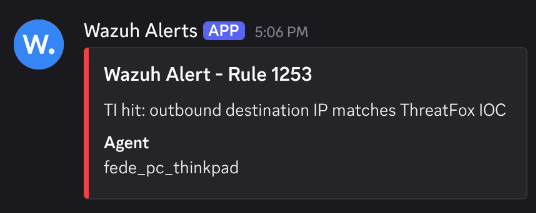
This provides immediate visibility into IOC matches without requiring continuous monitoring of the Wazuh dashboard.
The demonstration confirms that the full pipeline operates as expected:
Threat Feed → Normalization → CDB List → Telemetry Match → Wazuh Alert → Discord Notification
6. A Practical Alternative While Waiting for Native CTI
This implementation is not meant to replace a fully integrated CTI platform.
It is a practical approach built with the tools Wazuh already provides: CDB lists, custom rules, and structured telemetry.
The goal was simple: automate external threat feed ingestion and make IOC matching usable today without modifying the core platform.
The pipeline is straightforward. Indicators are collected, normalized, deduplicated, and compiled into CDB lists. During event analysis, extracted fields are matched against these lists through the rule engine. When a match occurs, the rule tree determines the outcome.
Wazuh is evolving its native Cyber Threat Intelligence capabilities, and a fully integrated CTI framework inside the platform is the right long-term direction.
Until then, this setup offers a practical way to operationalize external threat intelligence using the current available tools.